10个Claude工作流,每周省下 13小时

链接:https://zhuanlan.zhihu.com/p/2020632380063401680
来源:知乎
著作权归作者所有。商业转载请联系作者获得授权,非商业转载请注明出处。
你有没有算过,每周有多少时间花在”伪工作”上?打开十几个标签页、重复读同一份文档、被 Twitter 分心、做了一堆事却感觉没什么产出——这些看似在忙的事情,其实是最大的时间黑洞。
最近看到一篇实测文章,作者追踪了自己两周的 Claude 使用记录,发现10 个工作流帮他每周省下 13小时。什么概念?相当于每个月多出 2 个工作日。
更关键的是,这些工作流不需要任何技术门槛——只要 Claude 网页版就够了。没有 API,没有终端命令,没有复杂配置。
下面笔者就带大家逐个拆解这 10 个工作流,看看哪些能直接拿来用。
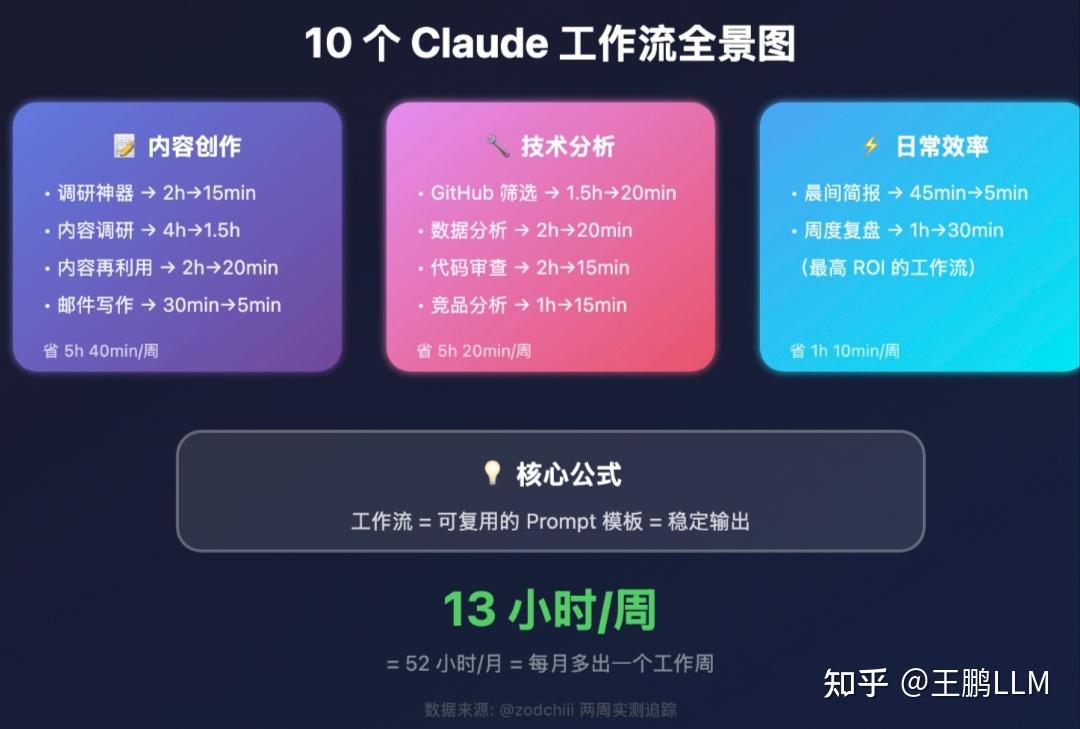
在深入之前,先明确一个概念。工作流(Workflow)——简单说就是”可复用的 Prompt 模板”。同样的输入格式,同样的输出要求,每次都稳定产出预期结果。
比如你每次做调研都用同一套提问方式,每次写邮件都用同一套结构——这就是工作流。
它和随便问一句的区别在于:工作流是系统化的,不是灵光一现。
工作流 1:调研神器——从 2 小时到 15 分钟
场景:需要研究某个主题,传统做法是打开十几个标签页,复制粘贴到文档里,然后被 Twitter 分心,两小时后还在整理资料。
Prompt 模板:
Research [TOPIC]. Structure:
1. Executive summary (3 sentences max)
2. Key findings (top 5, ranked by impact)
3. What's missing: gaps in available info
4. Sources with URLs
If data is insufficient for any claim, say so.
Don't speculate. Don't pad.
最后一行是灵魂——”如果数据不足,直接说”。不加这句,Claude 会自信地编造数字。加上后,它会老老实实承认”这个数据我没有”,反而更可信。
工作流 2:内容调研——10 个来源 5 分钟搞定
场景:写一篇内容需要读 5-10 个来源(GitHub README、文档、博客、Twitter 线程),手动整理要一小时以上。
Prompt 模板:
Here are my sources on [TOPIC]:
[PASTE ALL RAW MATERIAL]
Extract:
1. The 5 facts that matter most for my audience (builders, not consumers)
2. Anything that contradicts the common narrative
3. Specific numbers: stars, users, funding, benchmarks
4. One angle nobody else is covering
If two sources disagree, show me both sides.
Don't summarize fluff. Only signal.
重点是”不要总结废话,只要干货”和”如果两个来源冲突,两边都展示”。这能帮你发现真正有价值的信息,而不是流水账。
工作流 3:GitHub 仓库筛选——1000 个仓库不用人工看
场景:需要从大量 GitHub 仓库中筛选值得关注的,人工看每个仓库要 3-5 分钟,1000 个就是 50 小时。
Prompt 模板:
Here's a list of GitHub repos with descriptions:
[PASTE BATCH]
For each repo, evaluate:
1. What it actually does (1 sentence, no marketing speak)
2. Traction signals: stars, recent commit activity, contributor count
3. Category: agent framework / dev tool / MCP / infrastructure / other
4. Worth featuring? Yes/No with one reason
Skip anything that's just a wrapper, a tutorial repo, or has no commits in 30+ days.
Sort the "Yes" picks by most interesting first.
最省时间的过滤器是”跳过 30 天没提交的仓库”。GitHub Trending 上很多项目其实已经停更了,这个过滤能帮你筛掉一半以上的”僵尸项目”。
作者实测:从 1000 个仓库筛选到 80 个需要人工复核的,节省了 40+ 小时。
工作流 4:数据分析——告别表格地狱
场景:需要分析数据(内容指标、交易表现、互动数据),但不想花 40 分钟搞 Excel 公式。
Prompt 模板:
Analyze this data. I need:
1. Top 3 trends over time
2. Anything unusual or unexpected
3. Correlations between [COLUMN A] and [COLUMN B]
Table first, then a 2-paragraph summary explaining what this means in plain English.
If the dataset is too small for a conclusion, say so.
直接上传 CSV 文件就行。Claude 会给你表格 + 两段大白话解释。如果你不懂统计学,这比自己在表格里折腾快多了。
工作流 5:竞品分析——从 1 小时到 15 分钟
场景:发现一个有意思的账号或项目,想快速了解它的定位、优劣势、可学习点。
Prompt 模板:
I'm analyzing [COMPETITOR/ACCOUNT]. Based on what you know + the data I'm providing:
1. Top 3 things they're doing well (be specific)
2. Gaps or weaknesses in their approach
3. What I can learn from them
4. How my positioning is different
About me: I write about AI tools, vibe coding, and crypto for builders. TG + X.
Don't say "they have a strong brand." Tell me WHY and what specifically makes it work.
关键是要告诉 Claude 你是谁,不只是竞品是谁。否则你会得到一个放之四海而皆准的 SWOT 分析,对任何人都有用,对你没用。
工作流 6:代码审查——发布前的最后一道防线
场景:用 AI 写了很多代码,发布前需要检查安全问题、逻辑漏洞、性能问题。
Prompt 模板:
Review this code for:
- Security issues (exposed keys, injection, XSS)
- Logic errors and edge cases I might have missed
- Performance problems
- Anything that would make a senior dev uncomfortable
For each issue: severity (Critical/High/Medium/Low), exact location, why it matters, and the corrected code.
Be harsh. "Looks good overall" is not helpful.
[PASTE CODE]
“Be harsh(严一点)”这三个字比你想象的重要。不加的话,Claude 会给你”代码结构不错,可以考虑…”这种客套话。加上后,它会变成你最需要的那种挑刺型资深工程师。
作者原话:”It’s better at being harsh than being nice, wild tbh”(它擅长挑刺胜过友善,挺狂野的)。
工作流 7:内容再利用——一篇变多端
场景:一篇文章要发多个平台(X、Telegram、公众号),每个平台调性不同,手动改写很累。
Prompt 模板:
Here's my article:
[PASTE OR UPLOAD]
Create:
1. A 2-sentence hook for X (include a specific number or claim from the article)
2. A 4-paragraph TG post with the key insight
3. A provocative quote-tweet caption (1 sentence)
4. 3 standalone insights that work as separate tweets throughout the week
Each piece must work independently. Someone who never read the article should still get value.
这个工作流可以双向使用。你可以把长文章拆成多条短内容,也可以把一周的短笔记汇总成长文章大纲。后者往往是最好内容的来源——因为碎片灵感在汇总时会碰撞出新东西。
工作流 8:写邮件——像人说的话
场景:写一封正式邮件,太生硬像机器人,太随意又不专业,纠结 15 分钟才写 4 句话。
Prompt 模板:
Draft an email.
To: [NAME + how I know them]
Goal: [WHAT I WANT THEM TO DO]
Tone: professional but sounds like a real person
Max: 5 sentences
Context: [THE SITUATION]
Does not sound like: a cold pitch template, corporate speak, or something ChatGPT would write.
No "I hope this email finds you well."
笔者注:”不要像 ChatGPT 写的”这句是关键。加上后,Claude 会写成”一个尊重对方时间的忙碌人士”的语气,而不是那套”希望这封邮件找到你一切安好”的机器人模板。
工作流 9:晨间简报——45 分钟变 5 分钟
场景:每天早上刷 Twitter”了解动态”,结果刷了 45 分钟,大部分是 drama、meme 和无意义内容。
Prompt 模板:
3-minute briefing:
1. Top 3 AI news from last 24 hours (one sentence each)
2. Crypto: major moves, liquidations, new narratives
3. Anything I should know before posting content today
Be specific: names, numbers, links.
Skip anything that isn't genuinely important.
3 real updates > 10 filler items.
这个工作流用 Claude 获取信号,过滤噪音。当然,它不是完美的——最近一小时的突发新闻可能会漏。但它能抓住 80% 的重要信息,而那 20% 你会在群聊和通知里自然看到。
时间账:每天省 40 分钟,一周就是 4.6 小时。
工作流 10:周度复盘——最高 ROI 的习惯
场景:周末把一周的笔记、想法、收藏丢给 AI,让它帮你找模式和下一步方向。
Prompt 模板:
Here are my notes and ideas from this week:
[PASTE EVERYTHING]
Help me:
1. Find patterns: what topics am I gravitating toward?
2. Which 3 ideas have the most content potential?
3. What am I ignoring that I shouldn't be?
4. Content plan for next week: 3 TG posts + 1 article topic
Be honest. If an idea is weak, say so. Don't tell me everything is great.
笔者注:这是 Claude 从”工具”变成”思考伙伴”的关键时刻。它能发现你自己看不到的模式——因为你在自己的想法里太近了,它在外围反而看得清。
时间账:周日 30 分钟,换来一周不纠结”写什么”。这是作者认为 ROI 最高的工作流。
作者追踪了两周,以下是实测数据:
13 小时/周 = 52 小时/月 = 每月多出一个工作周。
当然,这些数字是作者的场景。每个人的工作流不同,但哪怕只采用 3-4 个,也能省下 5+ 小时/周。
看完这 10 个工作流,认识到工作流的本质是把”隐性知识”变成”显性模板”
每个工作流背后,都是一种思考方式的固化。比如”如果数据不足就说出来”这条规则,其实是对”严谨性”的要求。你自己做调研时可能也有这个意识,但没有写成 Prompt,每次都要重新想。
工作流就是把你的经验变成可复用的代码。
作者说得对:大多数人说的”在工作”,其实是”上下文切换”——打开标签页、重新阅读、被分心、回过神来继续。这些都不是真正的产出。
AI 解决的是那 60% 包围你核心工作的杂事。思考、判断、决策还是你来做,但第一稿、初步分析、格式化,这些可以交给 AI。
参考:
10 Claude Workflows That Save Me 10+ Hours a Week – @zodchiii
